





Docking and Power
The ChargeDOCK™ gives your setup the unique ability to easily dock and power your tablet directly to the wall or another VESA compatible mount. Docking and power all in one truly distinctive product.
Learn more...
Learn more...


iPad / Android Tablet Open Enclosure
Our VidaMount OpenVESA™ Tablet Enclosures are engineered like no other enclosure on the market today. With open button access for ease of use, open mic & speaker for optimal sound performance, secured within an ultra-slim bezel - this cutting edge, 3D printed enclosure wraps your iPad, Android, or Windows tablet strikes the perfect balance between open access with theft prevention.
Learn more...
US Patent Pending
Learn more...
US Patent Pending

Uniquely Powerful Combo
The ChargeDOCK™ mounts directly onto any wall - creating a simple docking station for your VidaMount tablet enclosure. Our patent-pending design allows you to dock for power and stationary use of your tablet. Or undock for those situations when portablilty is needed!

Easy Wall Mount Installation
Install the ChargeDOCK™ directly to the wall in minutes! Mount it over a standard single gang box, then connect your charging cable to its rear USB-C input!

High Speed Charging!
ChargeDOCK's patent-pending USB-C docking supports 60+W of power & wired Gigabit Ethernet to any iPad, Samsung Galaxy Tab, Lenovo Tab, Amazon Fire, Microsoft Surface, and other popular tablets!
Draw power from recessed power outlet, a PoE DataCharger, or your tablet's original charger / power transformer!
Draw power from recessed power outlet, a PoE DataCharger, or your tablet's original charger / power transformer!


Compatible w. 3rd Party VESA Mounts
with Integrated Cable Management
with Integrated Cable Management
Whether we're mounting onto a genuine VidaMount VESA bracket or a 3rd party VESA arm/mount - ChargeDOCK's modular End Caps allow you to swap between hidden wiring (for VidaMount VESA brackets) or external cable management (for 3rd party VESA mounts) - with 24/7 charging for either setup!
Multiple, Configurable Docking Security Options
Need to change your dock between easy, anytime removal [versus] theft-deterrent security? Our patent-pending modular Inserts allow you to change its security level anytime - full details below!

Choose Your Release
Keyed Release (Requires Tool for Removal)
Installing the Keyed Release Insert secures the device onto your ChargeDOCK™ and prevents removal by default. To remove - insert the supplied key into the service hole - then press-in and lift your screen up at the same time to release! Ideal for public spaces where theft-deterrence is required.
Button Release (Minimal Security = Easy Removal)
Installed by default, simply press the Button and lift your device up to release! Ideal for adjustable setups that need easy removal, this prevents your screen from popping off unintentionally when it's being handled to adjust the angle or height of your mount or stand.
Lift Release (No Security = Easiest Removal)
Installing the Lift Release Insert allows simple, "just pull up" accessibility in removing the tablet. Ideal for fixed (non-adjustable) setups where quick access is paramount.
Installing the Keyed Release Insert secures the device onto your ChargeDOCK™ and prevents removal by default. To remove - insert the supplied key into the service hole - then press-in and lift your screen up at the same time to release! Ideal for public spaces where theft-deterrence is required.
Button Release (Minimal Security = Easy Removal)
Installed by default, simply press the Button and lift your device up to release! Ideal for adjustable setups that need easy removal, this prevents your screen from popping off unintentionally when it's being handled to adjust the angle or height of your mount or stand.
Lift Release (No Security = Easiest Removal)
Installing the Lift Release Insert allows simple, "just pull up" accessibility in removing the tablet. Ideal for fixed (non-adjustable) setups where quick access is paramount.

Custom: Older Lightning / MicroUSB Devices Supported
Have an older, non-USBC device or tablet that you need this feature for? VidaBox can provide custom builds to support older Lightning or Micro-USB based tablet devices - contact us for details!

Don't need security?
Consider our "ChargeDOCK™ EZ" model, which allows for:
- [Tab Release] Press a tab and lift up for removal [or]
- [Lift Release] Just "lift up" for removal
Click here to learn more!
- [Tab Release] Press a tab and lift up for removal [or]
- [Lift Release] Just "lift up" for removal
Click here to learn more!

Beautifully Manufactured
While most 3D printed designs are typically flawed - VidaBox has perfected higher-quality outputs thru painstaking, careful Research & Development. Expect 99.9% perfectly textured back plates & clean, beveled edges - just like what's shown in the pictures!
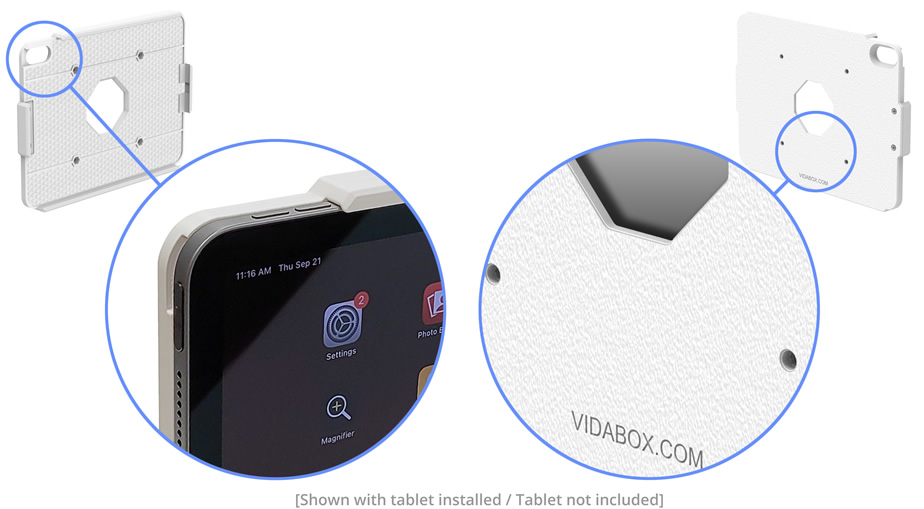
Open, Slim & Sleek Design
OpenVESA™, our ultra-thin design for setups that want to show off a tablet securely, with minimal compromises to security. Blends into any environment with black or white choices for a perfect fit!


Includes Hidden USB-C Ribbon Cable
Easily provide power & data to your installed tablet with the included USB-C Ribbon Cable, designed to neatly hide inside of the OPENVESA enclosure. The male end connects to your tablet, with the female end ready to connect to your power/data source. [Connects to / requires a USB-C 3.1 or higher spec cable. Not compatible with USB-C 2.0 cables]
Complete Button,
Port & Camera Access
Port & Camera Access
Have a headphone jack or other I/O port on your tablet that we need to connect into? Need complete access to both the front and back cameras? Be our guest! The OpenVESA™'s unique design allows the tablet to stay affixed and secure, while allowing easy, open access to every feature!
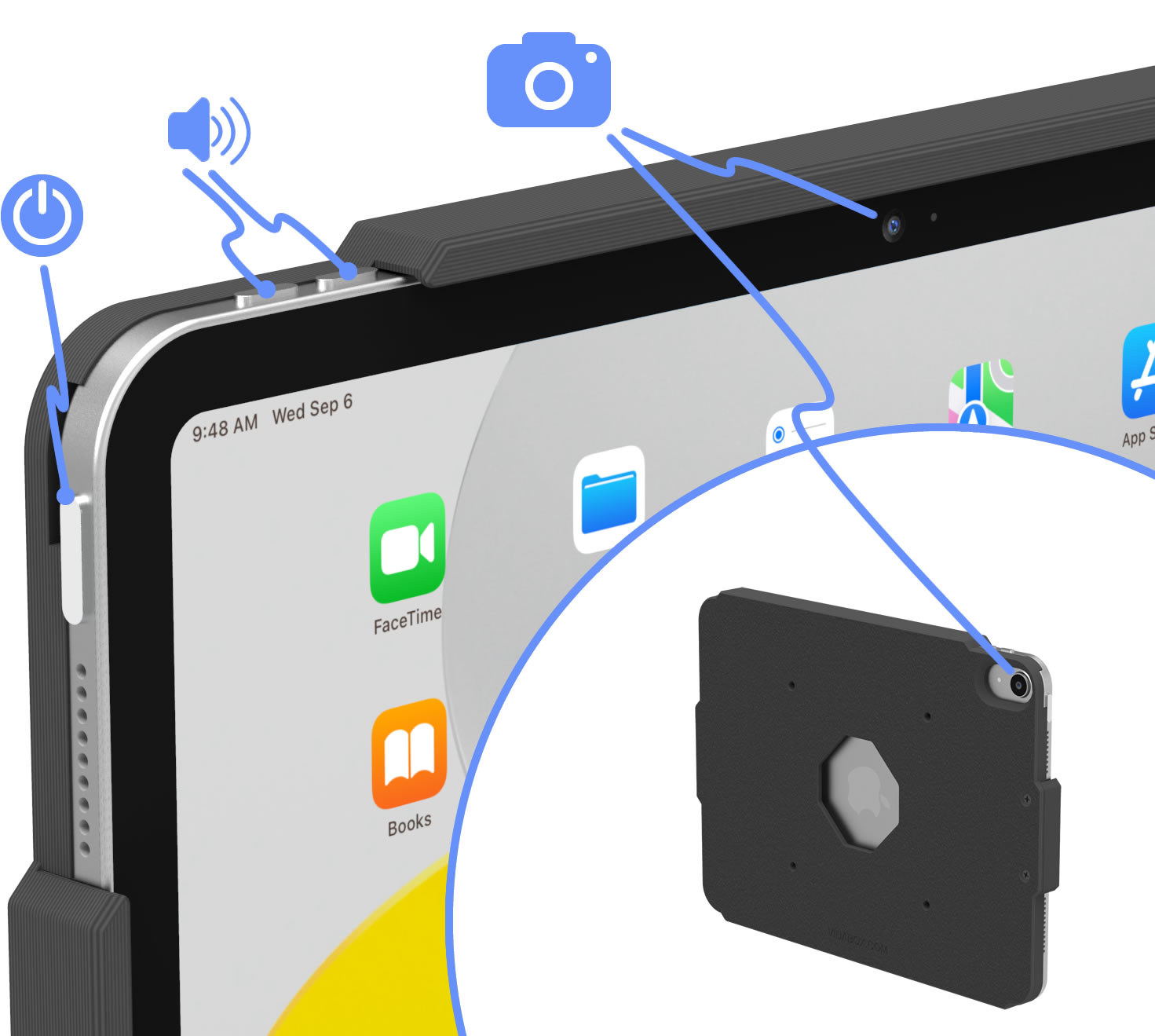
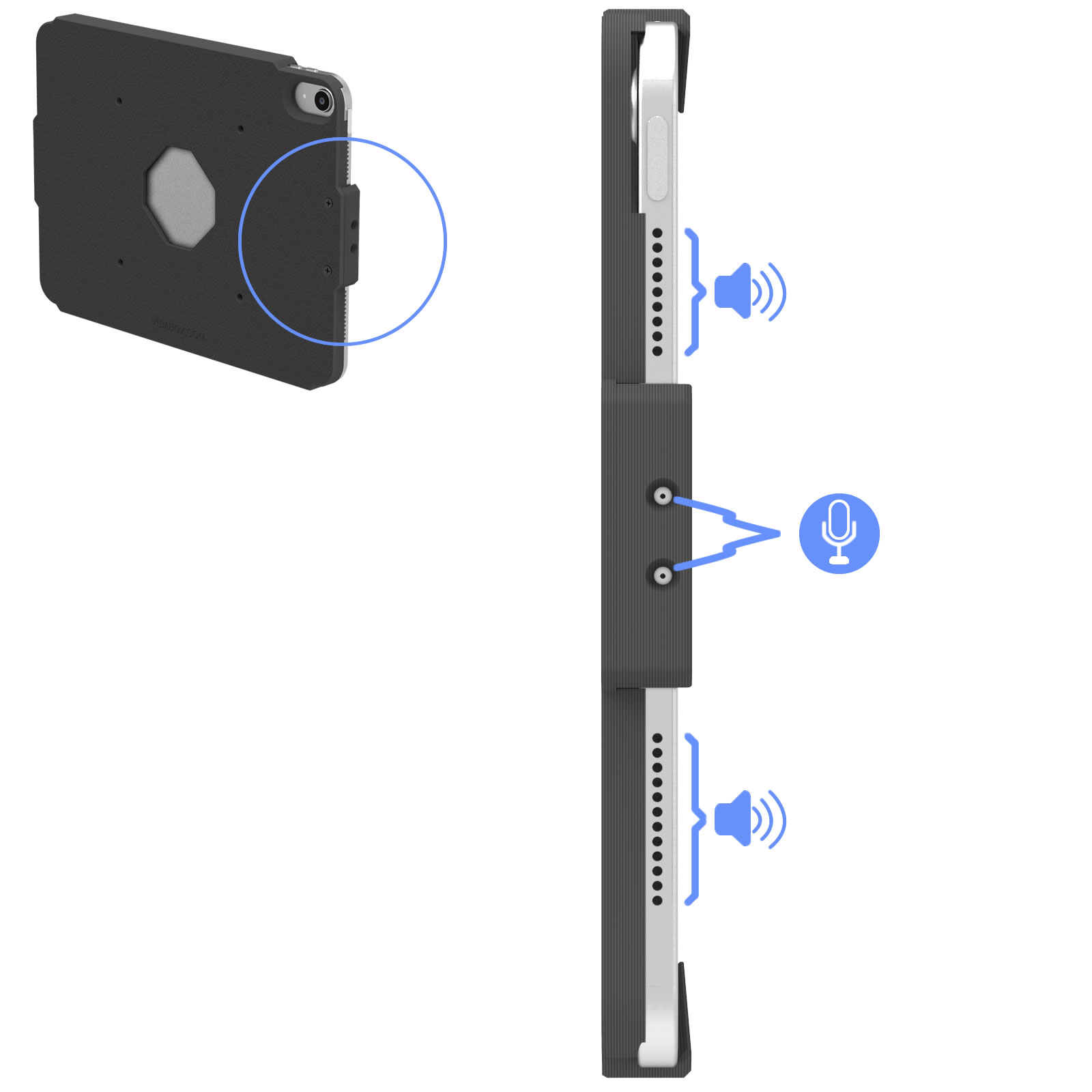
Open Speaker & Mic for Great Sound
All audio input and output ports are fully exposed to ambient, allowing perfect sound for teleconference apps - where audio clarity is key!
Optional: Easy Tablet Access
Need to slide your tablet in and out quickly and easily? Simply set up the OpenVESA™ enclosure without the Side Edge Retainer to allow quick removal at anytime!


ADA Compliant Design
This VidaMount design meets ADA compliance:
For wall-mounting:
· Maximum protrusion from wall of 4" or less
· Height between 27" to 80" high
For free-standing, forward reaching setups:
· Unobstructed touch access between 15" to 48" high
· Obstructed (>20") touch access between 15" to 44" high
For free-standing, side reaching touchpanels:
· Unobstructed touch access between 34" to 48" high
· Obstructed (<24"/>10") touch access between 34" to 46" high
For wall-mounting:
· Maximum protrusion from wall of 4" or less
· Height between 27" to 80" high
For free-standing, forward reaching setups:
· Unobstructed touch access between 15" to 48" high
· Obstructed (>20") touch access between 15" to 44" high
For free-standing, side reaching touchpanels:
· Unobstructed touch access between 34" to 48" high
· Obstructed (<24"/>10") touch access between 34" to 46" high
Portrait or Landscape
Sometimes, certain apps such as meeting room scheduling or reservation software are locked to a landscape orientation. Maybe the time card or "check in" app we're using is designed for a portrait view. No worries! Our VidaMount OpenVESA™ iPad / Tablet Enclosure can be mounted to its VESA bracket in either a portrait or landscape orientation.

Keep the Tablet Charged!
With our PoE charging solution (components sold separately), you can keep your tablet your plugged in and charging 24/7!
Locate a wall outlet [1] up to 330' (100m) away. Plug in our VidaPower® PoE++ Injector [Option A] or our VidaPower® PoE++ Switch [Option B] to the outlet, and [2] connect a standard CAT/Ethernet cable to the appropriate port.
Next, run the powered PoE/CAT5/5e/6 cable to your tablet location [3] and connect it to the 48V VidaPower® DataCharger™ or 48V VidaCharger™.
Finally, plug your VidaPower® High-Wattage USB-C Charging Cables to the USB-C port of the Adapter, connect your charging cable to your device [4] - and voila - we've connected wired power / data ! You're good!
Locate a wall outlet [1] up to 330' (100m) away. Plug in our VidaPower® PoE++ Injector [Option A] or our VidaPower® PoE++ Switch [Option B] to the outlet, and [2] connect a standard CAT/Ethernet cable to the appropriate port.
Next, run the powered PoE/CAT5/5e/6 cable to your tablet location [3] and connect it to the 48V VidaPower® DataCharger™ or 48V VidaCharger™.
Finally, plug your VidaPower® High-Wattage USB-C Charging Cables to the USB-C port of the Adapter, connect your charging cable to your device [4] - and voila - we've connected wired power / data ! You're good!

Secure and Theft-Deterrent
An open, slim-line design doesn't mean non-secure! Once installed, the tablet is NOT REMOVABLE unless someone has the right screw bits or drivers. Installing into a public location? No problem! Consider our Security Screw upgrade - making it impossible to disassemble with a standard Leatherman or pocket screwdriver - perfect for discouraging opportunistic thieves!

Customize It!
Do you need a design with certain buttons (power / volume) COVERED? Consider our VESALite™ enclosure with configurable buttons as an alternative! Or, if you need a design that exposes the USB power port for a specialty setup - contact us for a custom quote! [Minimum quantities apply] Contact Us for details!)
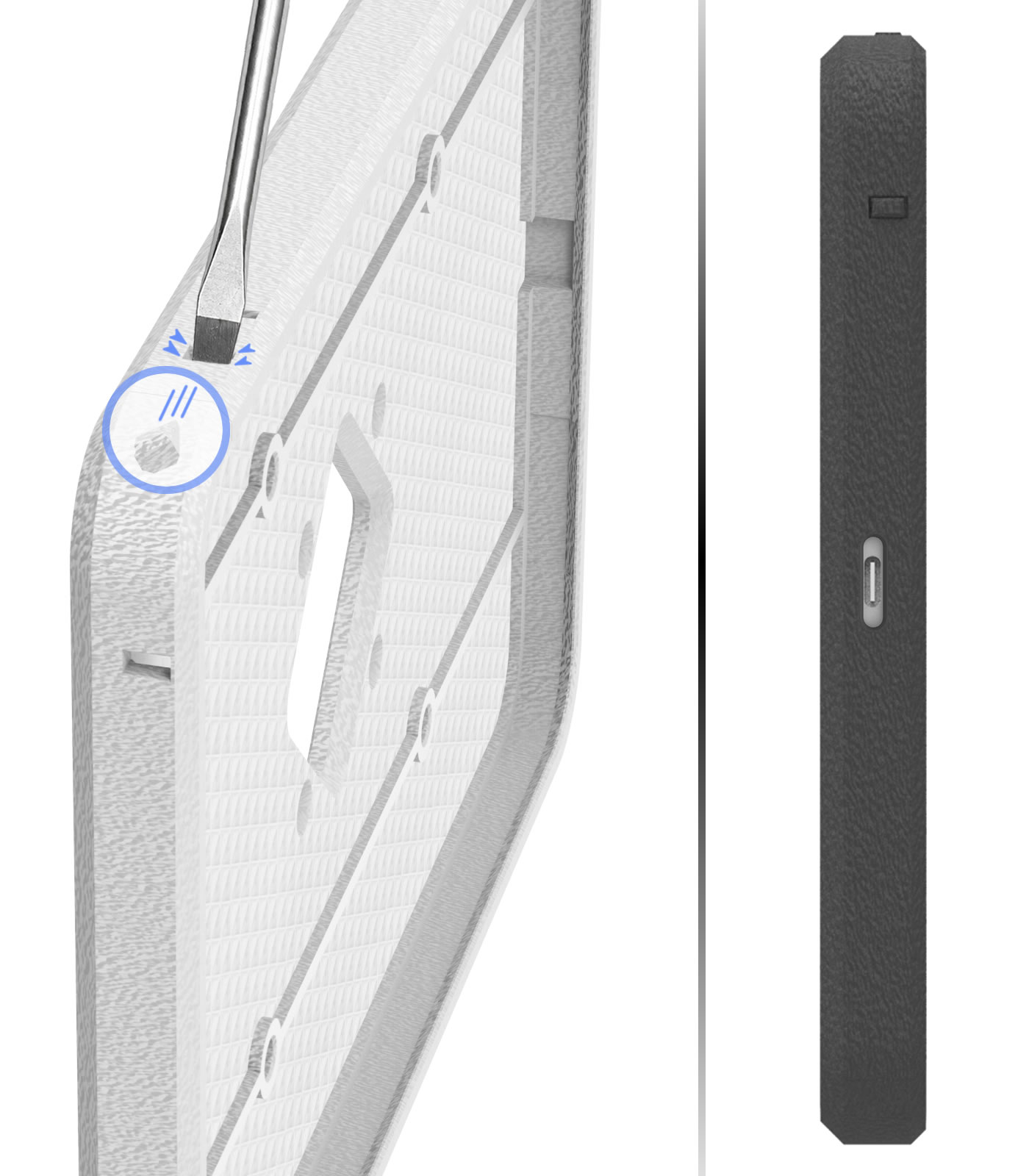

Wide Tablet Support
We have developed OpenVESA™ enclosures for many of the most popular tablet models, including:
For iPads
For Galaxy Tabs
- iPad Mini (6th Gen)
- iPad 10.9-inch (Gen 10)
- iPad Air 10.9 (Gen 4 | 5)
- iPad Pro 11-inch (Gen 1 | 2 | 3 | 4)
- iPad Pro 12.9-inch (Gen 4 | 5 | 6)
For Microsoft Surface
- Samsung Galaxy Tab A7 10.4 (2020)
- Samsung Galaxy Tab A8 10.5 (2022)
- Samsung Galaxy Tab A9 8.7
- Samsung Galaxy Tab A9+ 10.9
Don't see your tablet model? Contact us and let us know what you need.
Dimensions VESA 100 / Wall VidaMount® ChargeDOCK™

Dimensions : Enclosure


What's in the box
[Pre-Installed] (1) VidaPower USB-C Extension Ribbon Cable
[Pre-Installed] (1) U-Shaped USB-C Adapter
[Pre-Installed] (1) Solid End Cap [A]
[Pre-Installed] (1) Ribbon Cable End Cap [B]
(1) Cord End Cap [C]
(4) M4 x 16mm Countersink Screws for VESA Enclosure Connection
(4) M4 x 8mm Button Head Screws for VESA Mount Connection
(1) Hex Key for Key Release Insert
(4) 8-32 x 1 1/2" Wall Screws
(4) Hollow/Solid Wall Anchors
(1) [Pre-Installed] Button Release Insert
(1) Lift Release Insert
(1) Key Release Insert
Open Vesa iPad / Tablet Enclosure Installation Instructions [Download]
Installation instructions - VESA 100 / Wall VidaMount® ChargeDOCK™ [Download]
 WARNING: California Prop 65
This product can expose you to chemicals including lead, which is known to the State of California to cause cancer. For more information, go to P65Warnings.ca.gov


